Module 5: Build Context for Agents and Developers
How often have you needed to find API documentation for a service, or figure out which team owns a particular component, but didn’t know where to look? Maybe you searched Confluence, asked in Slack, or dug through old Jira tickets. The software catalog is the answer — for you and your AI agents.
Right now, Developer Hub is connected to your platform but the catalog is pretty bare with only the Parasol Insurance application used in the prior section. Parasol’s developers and their agentic coding harnesses can’t discover services, APIs, or documentation because nobody has registered them yet.
In this module, you will register Parasol’s existing software architecture in the catalog — Systems, Components, APIs, Resources, and documentation — creating a navigable map of the entire software landscape for AI agents and humans and expose it to agents via Model Context Protocol (MCP).
|
Skipped the previous modules? If you didn’t complete the previous module, you can fast-forward to this module’s starting state by running: Wait for the Application to sync and the Pod to become healthy before continuing: It can take up to 5 minutes for the initial deployment to become ready, as it has to load and configure Developer Hub plugins for the first time. |
Learning objectives
By the end of this module, you will be able to:
-
Understand the Backstage entity model (Components, Systems, APIs, Resources, Domains)
-
Visualize system architecture using System Diagrams and relationship graphs
-
Navigate domain documentation (including compliance information) through the catalog
-
Use Lightspeed to query the catalog with natural language, and expose an MCP server
-
Recognize the catalog as both a human-facing portal and a machine-readable knowledge graph for AI agents
The Backstage entity model
Before registering entities (like the Parasol Insurance component in the prior module), it’s worth understanding how the catalog organises information:
-
Component — A software unit (service, library, website) owned by a team
-
API — An interface exposed by a component (REST, gRPC, event)
-
System — A group of related components that form a product or capability
-
Resource — Infrastructure dependencies (databases, queues, clusters)
-
Domain — A business area that owns systems
Each entity is defined in a YAML file (commonly named catalog-info.yaml) file that typically lives alongside the source code. The team that owns a component is responsible for maintaining its catalog-info.yaml — just like they maintain the code itself. Developer Hub reads these files and builds the catalog graph.

Not every entity needs a hand-crafted YAML file, though. Providers (registered by plugins) often go further — the Keycloak provider you configured automatically generates User and Group entities using data from Keycloak, and CI/CD integrations can surface pipeline and deployment data without any catalog changes at all.
Exercise 1: Enable the Entities Overlay
Parasol’s Platform Team have already used generative AI to map out Entities corresponding to their existing domains, systems, APIs, and components. You will view these files in a moment, but first let’s get Developer Hub to start ingesting them.
-
In the Argo CD tab, log in if prompted:
-
Click Log in via OpenShift, select the developers identity provider
-
Username:
pe1 -
Password:
{common_password}
-
-
Click on your developer-hub Application
-
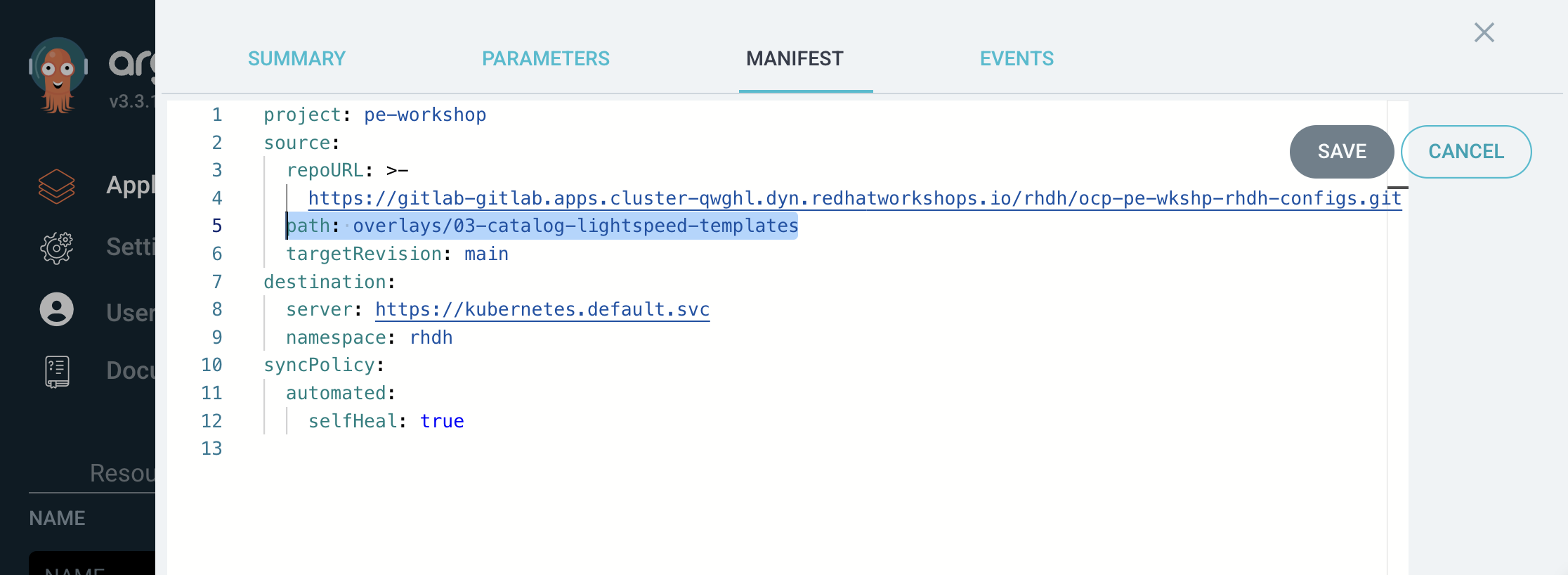
Click Details, then Manifest, and enable Edit mode to change the Path to:
overlays/03-catalog-lightspeed-templates -
Click Save and Argo CD will begin syncing the new overlay
This overlay adds catalog locations, software templates, RBAC policies, and AI capabilities (Lightspeed with MCP). These additional capabilities will be explored in subsequent sections of this workshop.
Exercise 2: Explore Parasol’s catalog entities repository
While Developer Hub is deploying, let’s take a look at the catalog entity definitions being imported.
Parasol’s catalog of entity definitions isn’t just for human consumption — it was also part of their AI strategy: structured, machine-readable documentation that AI assistants can query programmatically.
-
Refresh the GitLab tab on the right, and open the parasol/parasol-entities repository
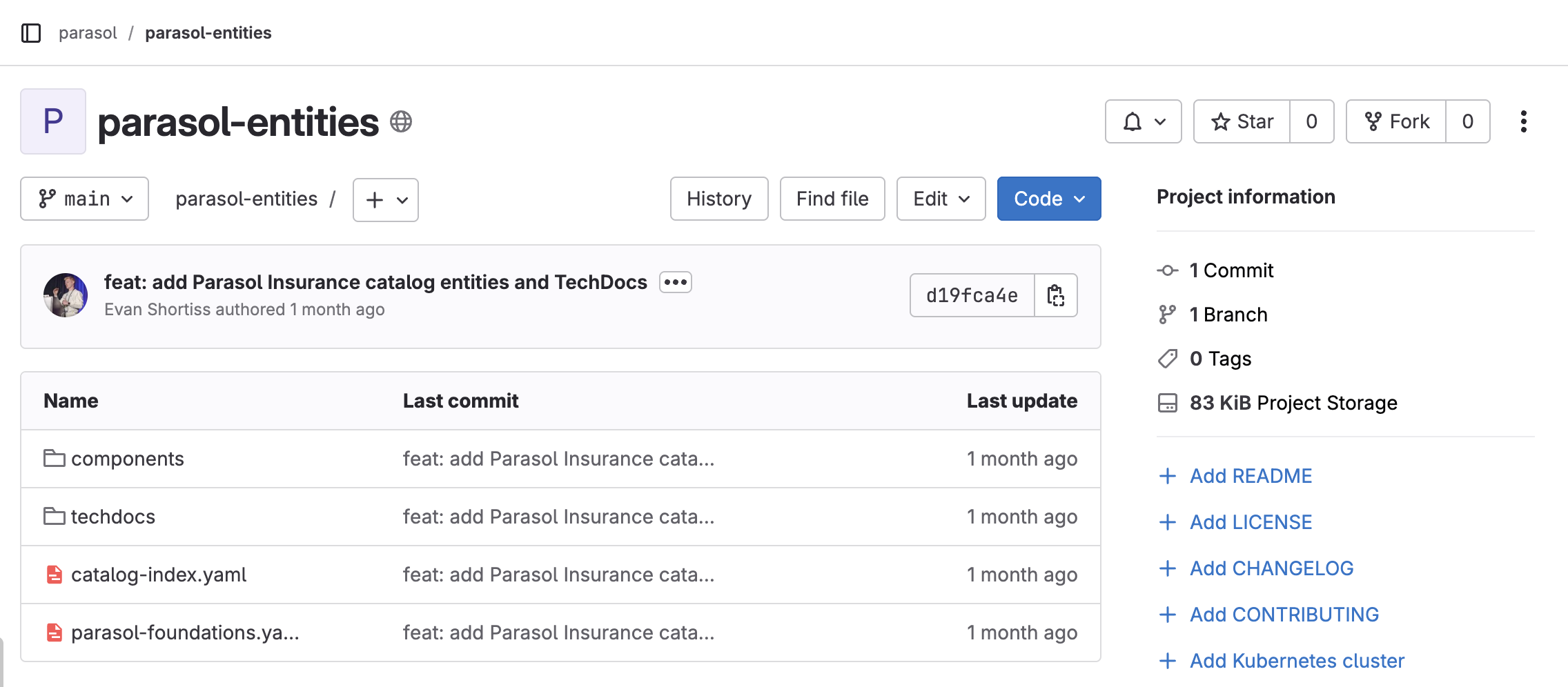 Figure 3. The
parasol-entitiesrepository in GitLab -
Open the catalog-index.yaml file at the repository root
This is the catalog index — a specialized Location entity that references all of Parasol’s architecture definitions in the
spec.targetsarray. -
Explore the techdocs/domains/billing-payments/ directory to see how documentation can be stored
This directory contains Markdown documentation for the Billing & Payments domain, including PCI-DSS compliance information you will explore later. While this example stores documentation in a dedicated repository, teams can also store docs alongside their component’s source code if they prefer.
-
Open one of the component files, such as components/parasol-catalog-claims.yaml
See how each component specifies its type, lifecycle, owner, system membership, and API dependencies. This metadata is what powers the System Diagrams and relationship graphs you will explore next.
Exercise 3: Explore the catalog in Developer Hub
Developer Hub is now importing the entity definitions you just explored in GitLab.
|
You will need to wait until the new Developer Hub pod has finished rolling out. Use the following command to observe and wait for a successful rollout: |
-
Open the Developer Hub tab and click the refresh icon at the top
-
Navigate to the Catalog page
-
You should see Parasol’s entities appearing. Use the Kind dropdown filter and select System to view system-level entities
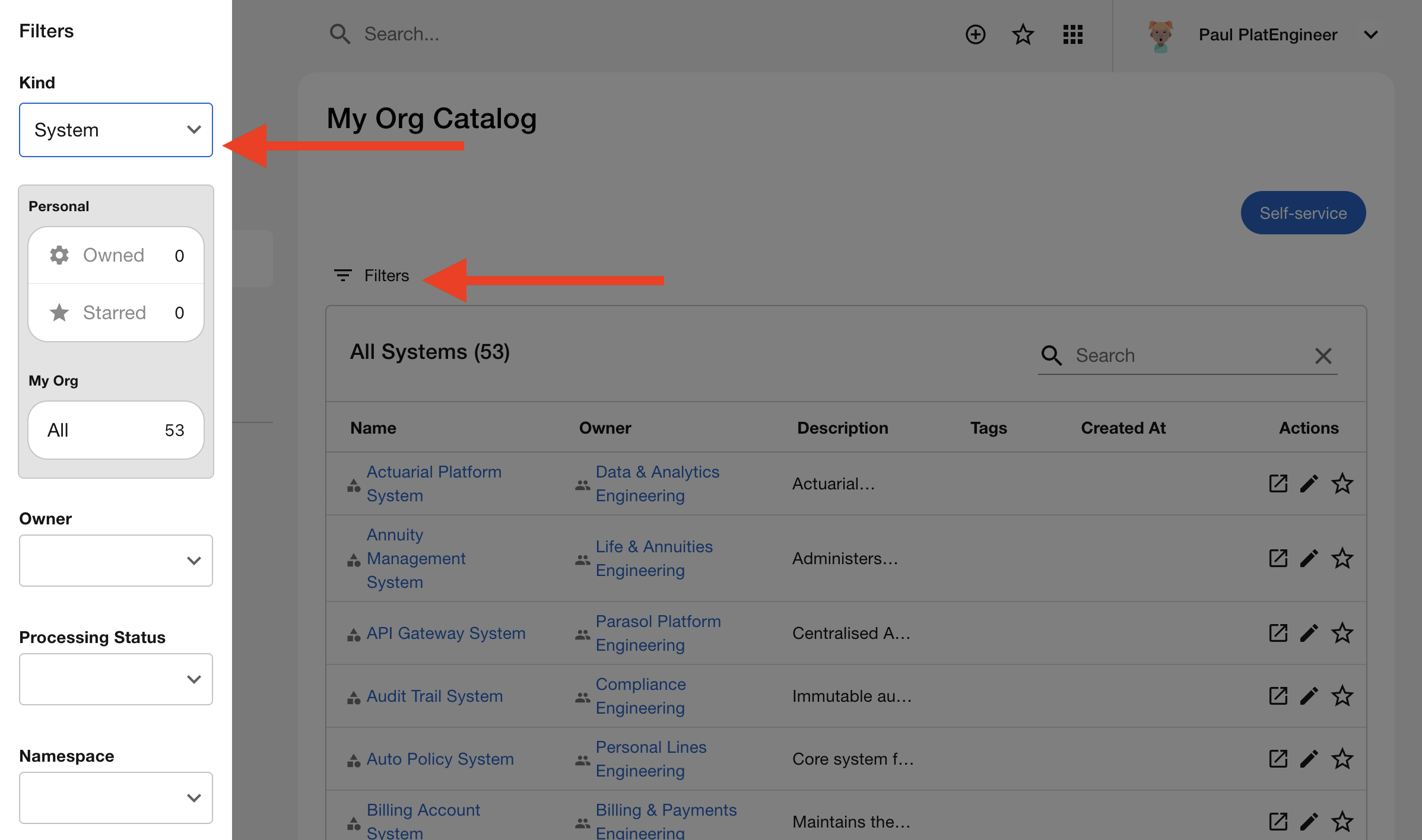 Figure 4. The Developer Hub catalog showing System entities
 -
Click on the API Gateway System to open its details page
-
Click the System Diagram button (near the top of the page)
This diagram visualizes Parasol’s software architecture at scale. Each box represents a Component (service), and the lines show API dependencies between them. You are seeing the entity definitions you just imported — Domains, Systems, Components, APIs, and Resources — rendered as an interactive graph.
Notice how the diagram shows:
-
Components grouped into their parent System
-
API relationships showing which services talk to each other
-
Resource dependencies like databases and message queues
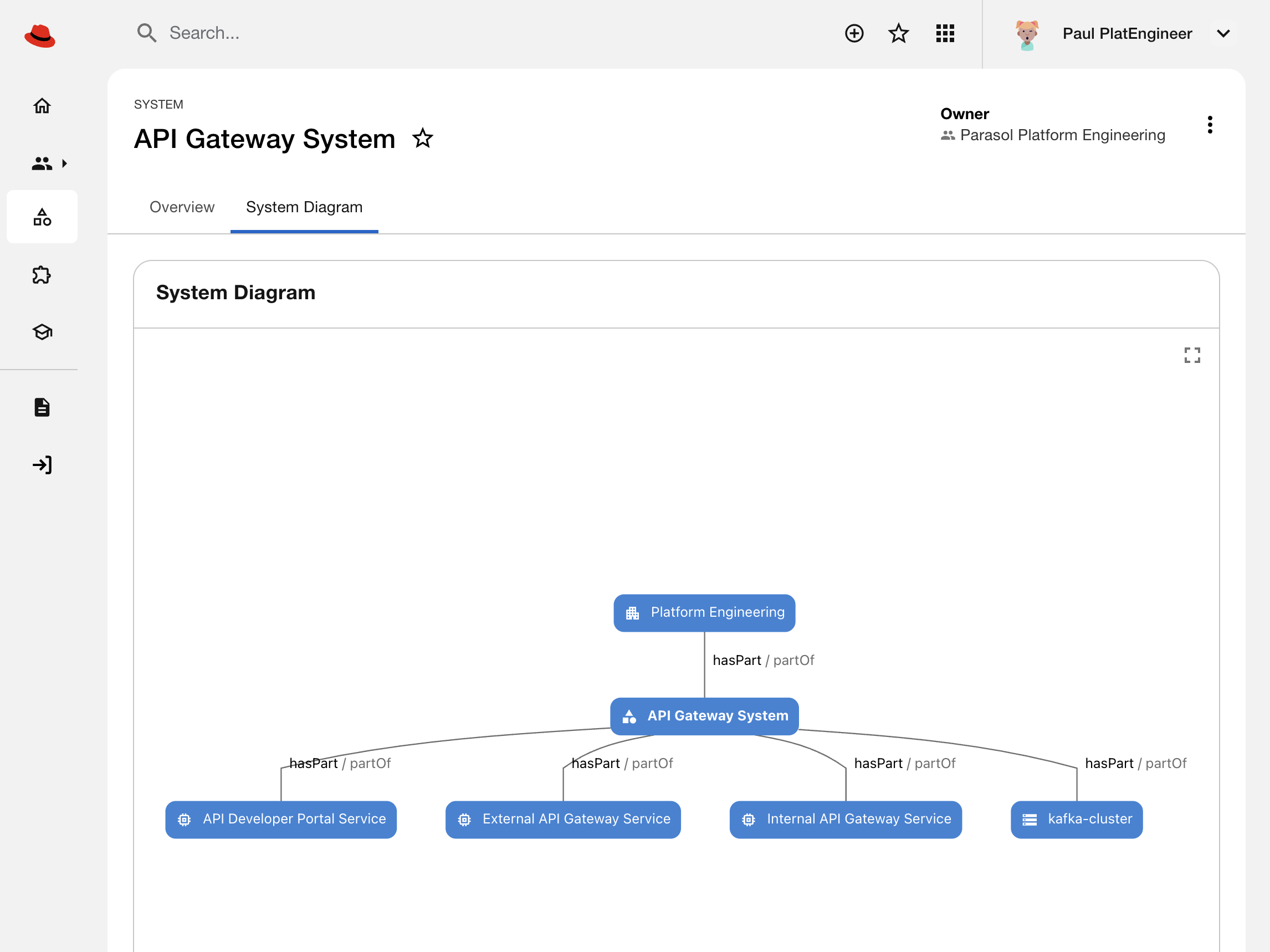 Figure 5. Developer Hub showing the API Gateway system diagram
-
-
Click View Graph (at the bottom right of the diagram)
This opens the full relationship graph with additional depth. You can:
-
Zoom and pan to explore the full topology
-
Click nodes to see entity details
-
Trace dependencies across multiple levels (e.g., which APIs a component uses, which resources those APIs depend on)
This is the catalog’s power: it doesn’t just list services, it models the relationships between them. When a developer asks "what does the Billing service depend on?", the graph shows the answer immediately.
-
-
Set Direction to left to right and Max Depth to 3 to see even more relationships.
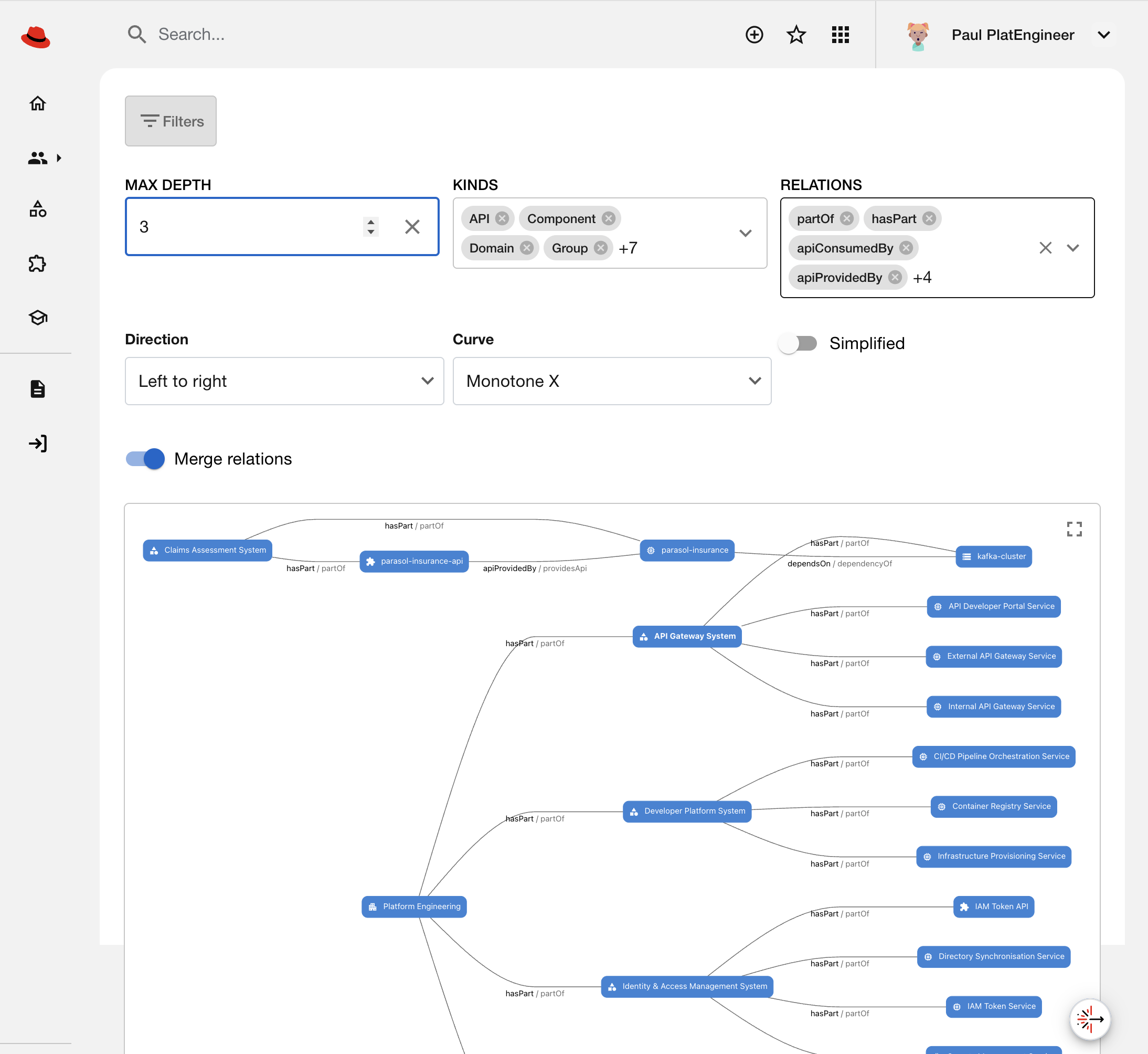 Figure 6. The API Gateway System relationships modeled with a depth of 3
 -
Click Docs in the left navigation bar, and use the Filters to show All documentation
-
Click on Billing & Payments in the documentation index
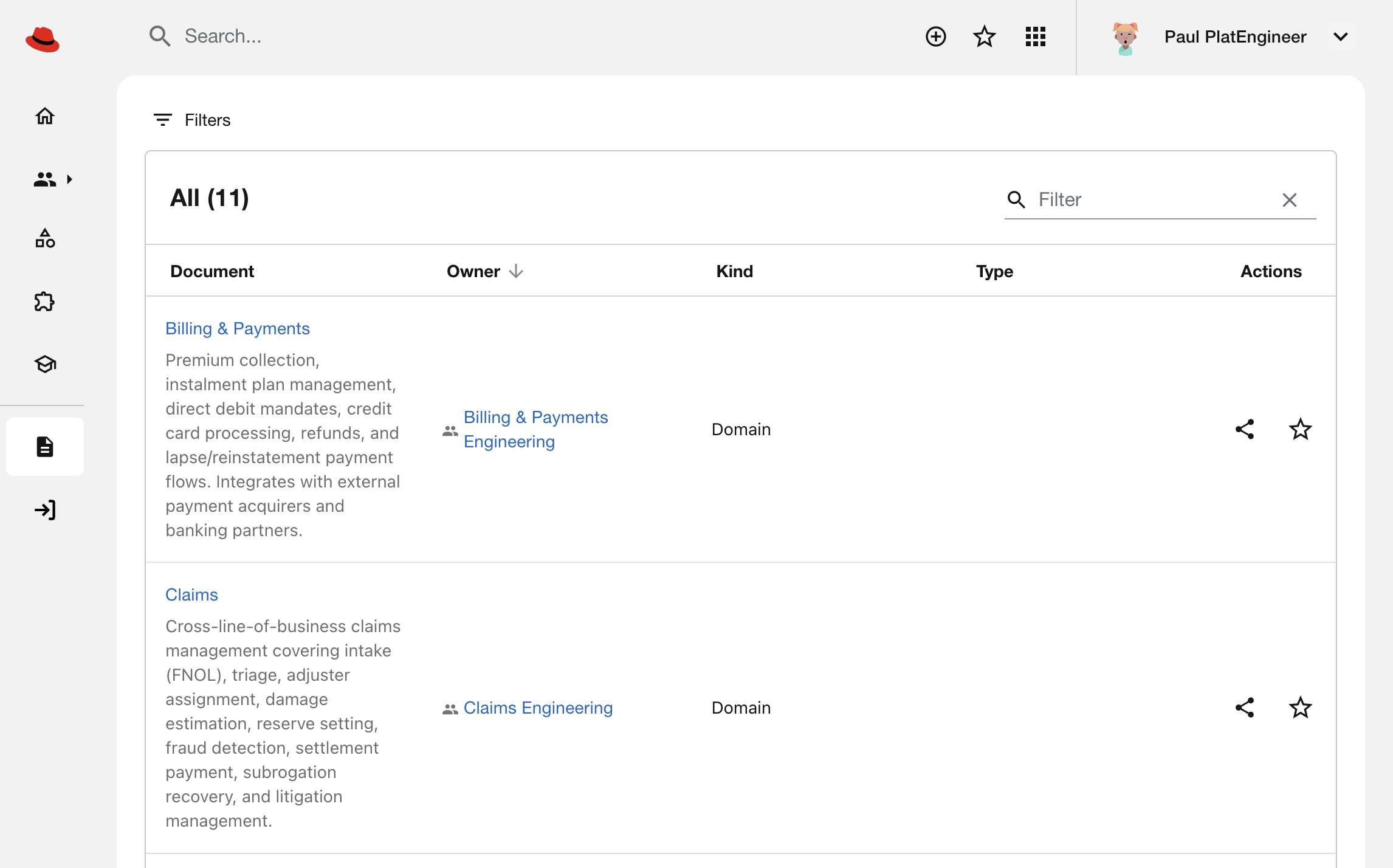 Figure 7. The TechDocs list in Developer Hub
You are now viewing domain-level documentation that lives alongside the catalog entities. This includes:
-
Architecture decision records (ADRs) explaining why the Billing system is structured this way
-
PCI-DSS compliance information documenting how payment data is handled securely
-
Onboarding guides for developers joining the Billing team
Notice that this documentation is discoverable through the same interface developers use to find services and APIs. It’s not buried in Confluence or a wiki — it’s registered in the catalog alongside the code.
-
Exercise 4: Query the catalog with Lightspeed
You’ve just explored the catalog visually as a human. Now see how AI agents can query the same catalog programmatically via the Model Context Protocol (MCP).
|
The overlay you just deployed includes Lightspeed — an AI assistant integrated into Developer Hub. Lightspeed runs as sidecar containers (llama-stack for LLM inference, lightspeed-core for the service layer) with MCP access to the catalog API. |
-
Open the Developer Hub tab and look for the floating Lightspeed icon in the bottom-right corner
-
Click the Lightspeed icon to open the chat interface
-
Use the three dots in the top-right of the Lightspeed interface and select Fullscreen
-
In the chat window, select the VLLM > qwen38-27b model
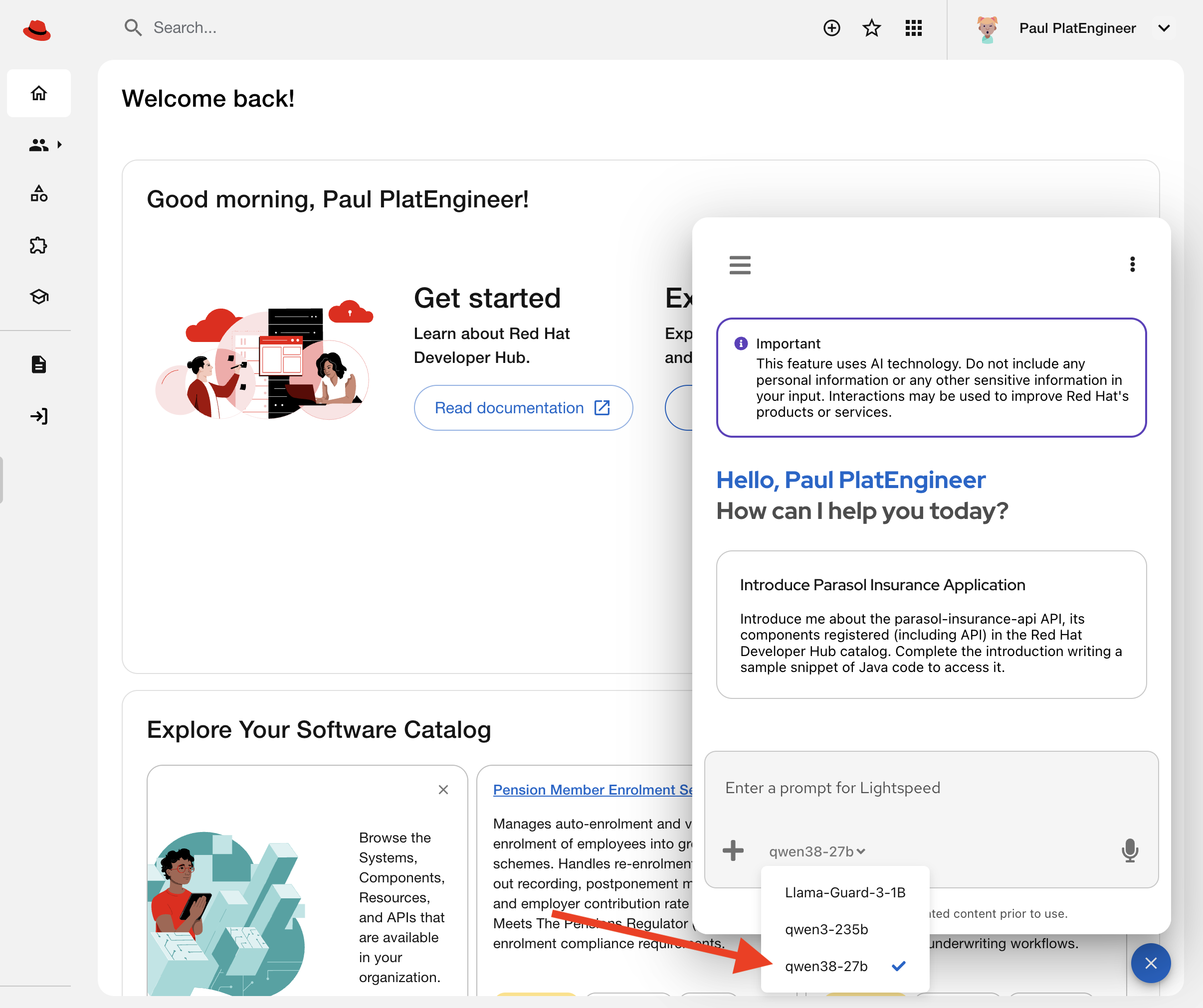 Figure 8. Lightspeed UI shown with a Qwen3-235B model selected
 -
Ask Lightspeed a question about compliance documentation:
How does Parasol handle PCI compliance? Perhaps we have documentation about billing and payments?Be patient as the model responds. You’re using a shared model hosted on our internal platform; sometimes it’s under load. -
Lightspeed uses MCP to query the catalog’s TechDocs API
-
Retrieves the Billing & Payments documentation you saw in Exercise 2
-
Returns an answer grounded in the actual compliance documentation
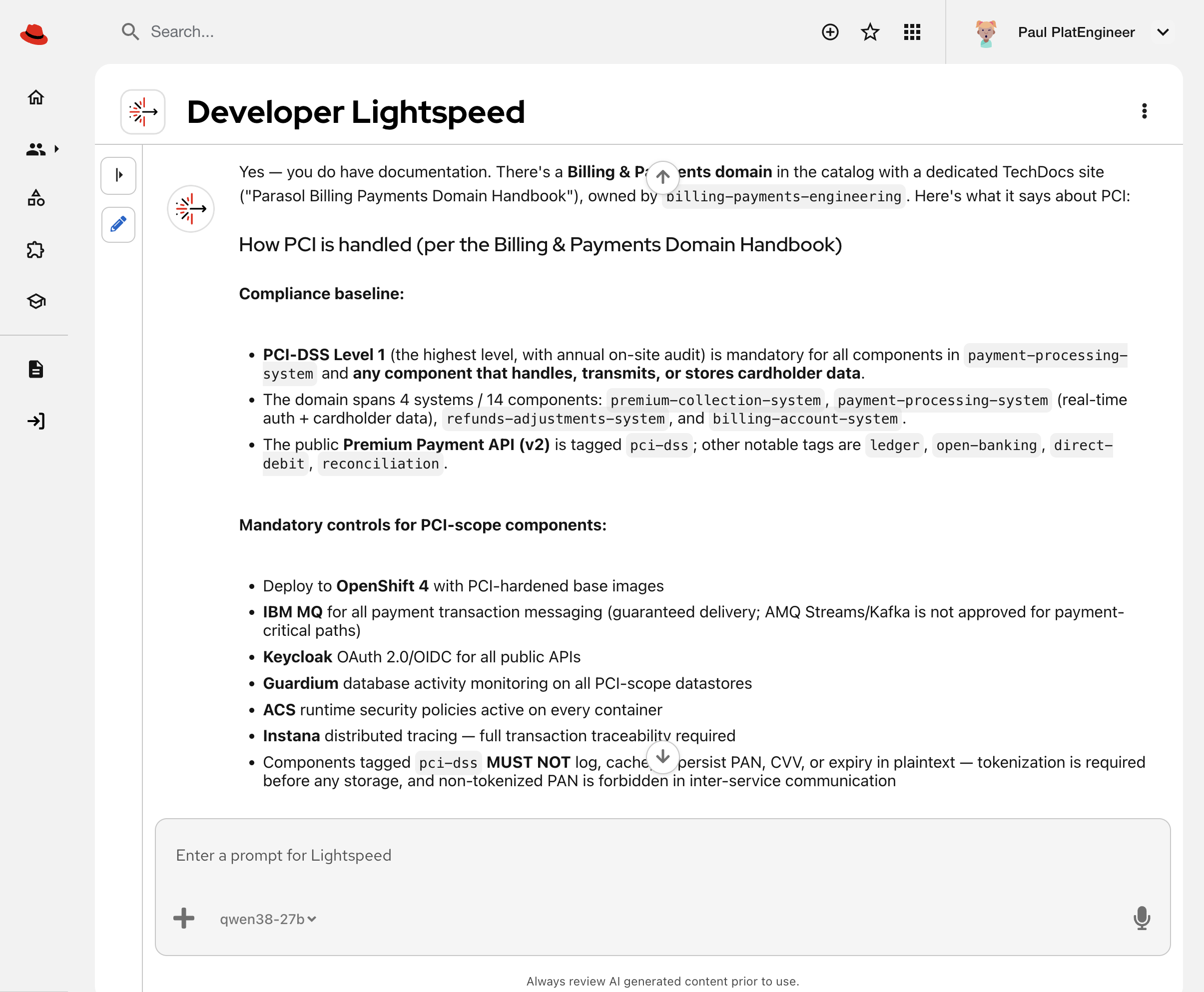 Figure 9. Lightspeed can read documentation to provide helpful, accurate, answers
-
-
Next, ask about system ownership:
Who should I talk to if I have questions about the API Gateway System?-
Lightspeed traverses the catalog’s relationship graph
-
Finds the owning Group and finds an associated Slack channel
As is the nature of LLMs, responses can vary. Your response is unlikely to match the screenshot below. 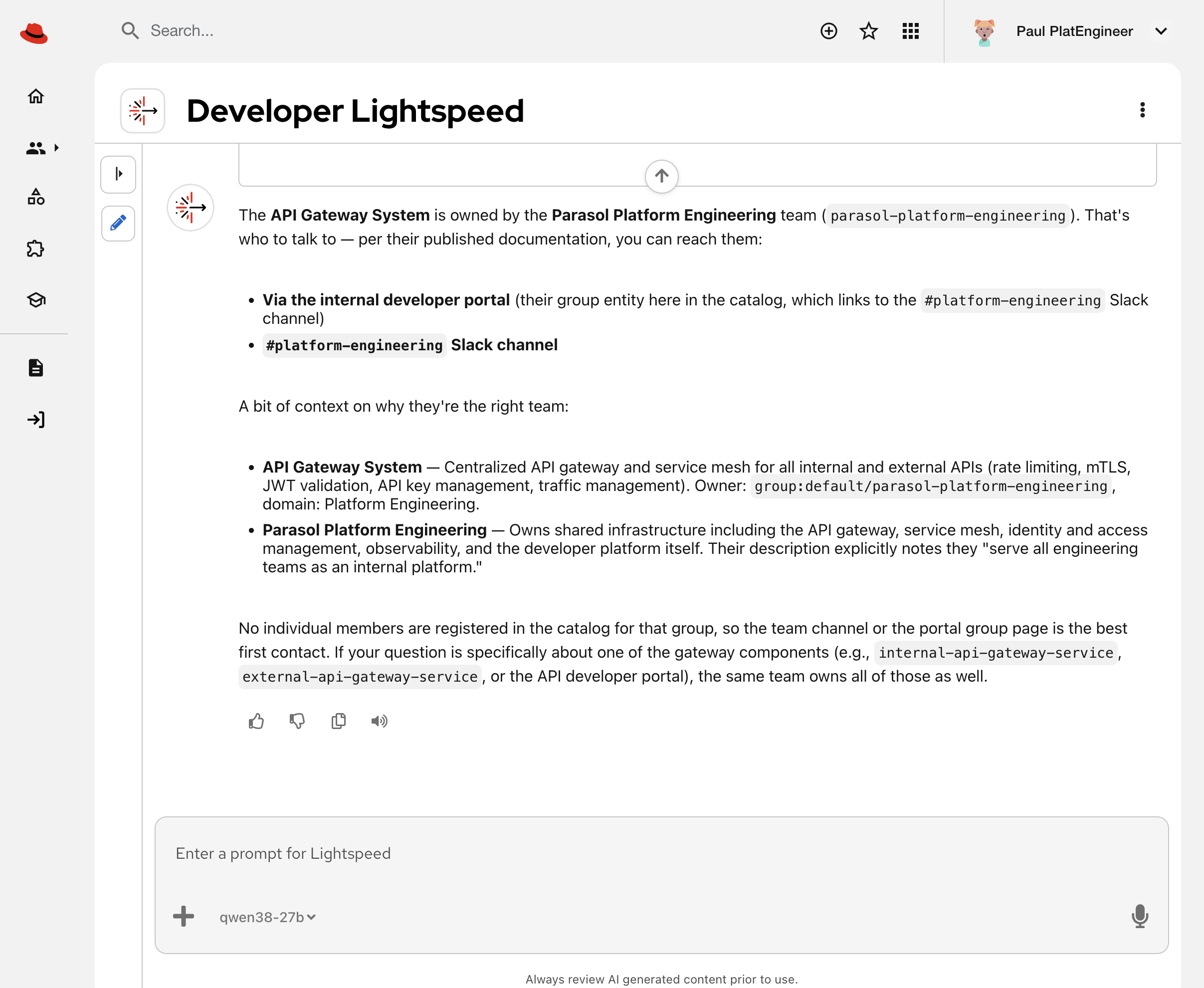 Figure 10. Lightspeed can determine ownership and generate contact links
-
-
Notice how Lightspeed’s answers reference real entities from your catalog, not generic responses
|
This is the platform engineering multiplier effect in action You built a machine-readable knowledge graph (the catalog). Now:
The catalog you just mapped isn’t just documentation — it’s operational intelligence accessible to both humans and machines. When a developer asks Lightspeed "How does Parasol handle PCI compliance?", they get the exact same Billing & Payments documentation you saw in Exercise 2 — retrieved via MCP, not hard-coded responses. This is why investing in catalog quality pays dividends: better human discovery AND better AI-powered assistance, both grounded in the same authoritative source. |
What changed?
This overlay added significant functionality to Developer Hub:
-
Catalog locations — Parasol’s architecture entities, example components, and golden-path templates are now imported.
-
Lightspeed AI assistant — An AI assistant powered by a large language model, with access to Red Hat Developer Hub product documentation.
-
MCP capabilites — Agents, like Lightspeed, can now query the catalog API and TechDocs programmatically via Model Context Protocol.
Module summary
Parasol’s Internal Developer Platform now has a mapped software architecture and an AI assistant that can query it.
The software catalog is more than a service registry — it’s a knowledge graph that models your entire software landscape. Systems, components, APIs, resources, teams, and documentation are all connected in a queryable structure.
For humans, this means:
-
Instant discovery — find services, APIs, and docs without filing tickets
-
Visual architecture — understand system dependencies through diagrams
-
Integrated information — CI/CD status, topology, and documentation in one place
For AI agents, this means:
-
Programmatic access via MCP to query catalog entities in real-time
-
Contextual answers grounded in authoritative, up-to-date documentation
-
Relationship traversal to answer questions like "what depends on this API?" or "which team owns the Billing service?"
The catalog isn’t just documentation — it’s operational intelligence accessible to both humans and machines.
Next steps:
In the next module, you will see how developers use golden-path templates to create new applications. These applications implement secure software supply chain practices, use standardized build and deployment manifests, and automatically register themselves in this catalog, continuing the cycle of discoverable, AI-queryable platform intelligence.