Module 6: Enable self-service with templates
Parasol’s developers can now discover existing services in the catalog and query it with AI. But what about creating new ones? Today, spinning up a new application means copying an old project, manually configuring CI/CD, writing deployment YAML, and hoping you remembered all the security requirements.
Software templates are the golden paths of platform engineering. They encode your organisation’s best practices into a self-service workflow that developers can consume. When a developer uses a template, they get a production-ready application without writing a single line of infrastructure code.
In addition to this, it’s imperative that organizations adopt a trusted secure software supply chain practices. This includes, but isn’t limited to generating and managing SBOMs (software bill of materials) from your own build process and 3rd party libraries, image and dependency vulnerability scanning, artifact signing, SLSA (Supply-chain Levels for Software Artifacts) attestions, signature and attestation validation at deploy time, and continuous policy enforcement on-cluster.
Software templates simplify this process by abstracting away the supply chain security aspects of the pipeline, allowing developers to focus on code while the platform team ensures compliance is in place.
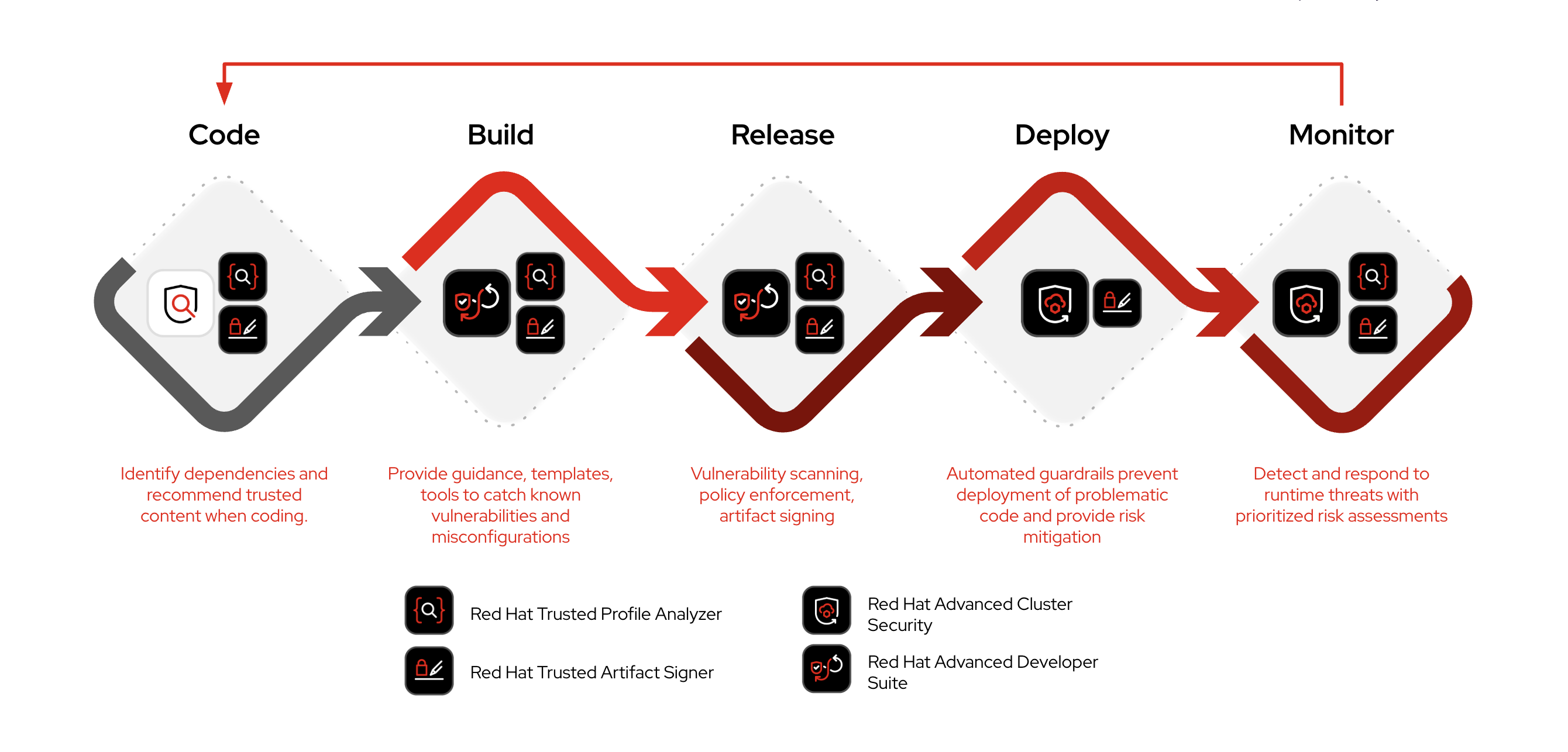
What today’s sample template delivers:
-
Zero YAML required — developers write Java, Node.js, or Python; the platform team’s build and deploy Helm charts handle all infrastructure configuration
-
Security by default — automated SonarQube code analysis, Red Hat Advanced Cluster Security image scanning, and SBOM generation with Red Hat Trusted Profile Analyzer monitoring
-
GitOps-driven deployment — changes flow through build → dev → prod namespaces via Argo CD, following the platform team’s promotion workflow
-
Full observability — ServiceMonitors, network policies, health checks, and resource limits configured automatically
The golden-path template was already imported in the prior module alongside the catalog entities. In this module, you will experience the developer’s self-service workflow by running the template and inspecting the platform infrastructure it creates.
|
Skipped the previous modules? If you didn’t complete the previous module, you can fast-forward to this module’s starting state by running: Wait for the Application to sync and the Pod to become healthy before continuing: It can take up to 5 minutes for the initial deployment to become ready, as it has to load and configure Developer Hub plugins for the first time. |
Learning objectives
By the end of this module, you will be able to:
-
Understand how software templates enable zero-YAML developer self-service
-
Run a template to create a production-ready application with automated security gates
-
Inspect the multi-namespace architecture and CI/CD pipeline created by the platform
-
Articulate the platform engineering value proposition: standardized infrastructure, security by default, and developer velocity
Exercise 1: Explore the template
-
Open the Developer Hub tab and log in as
dev1(password:{common_password}) if you are not already logged in as that user -
Navigate to the Create page (or click the Self-service button in the global header)
-
You should see the imported software template
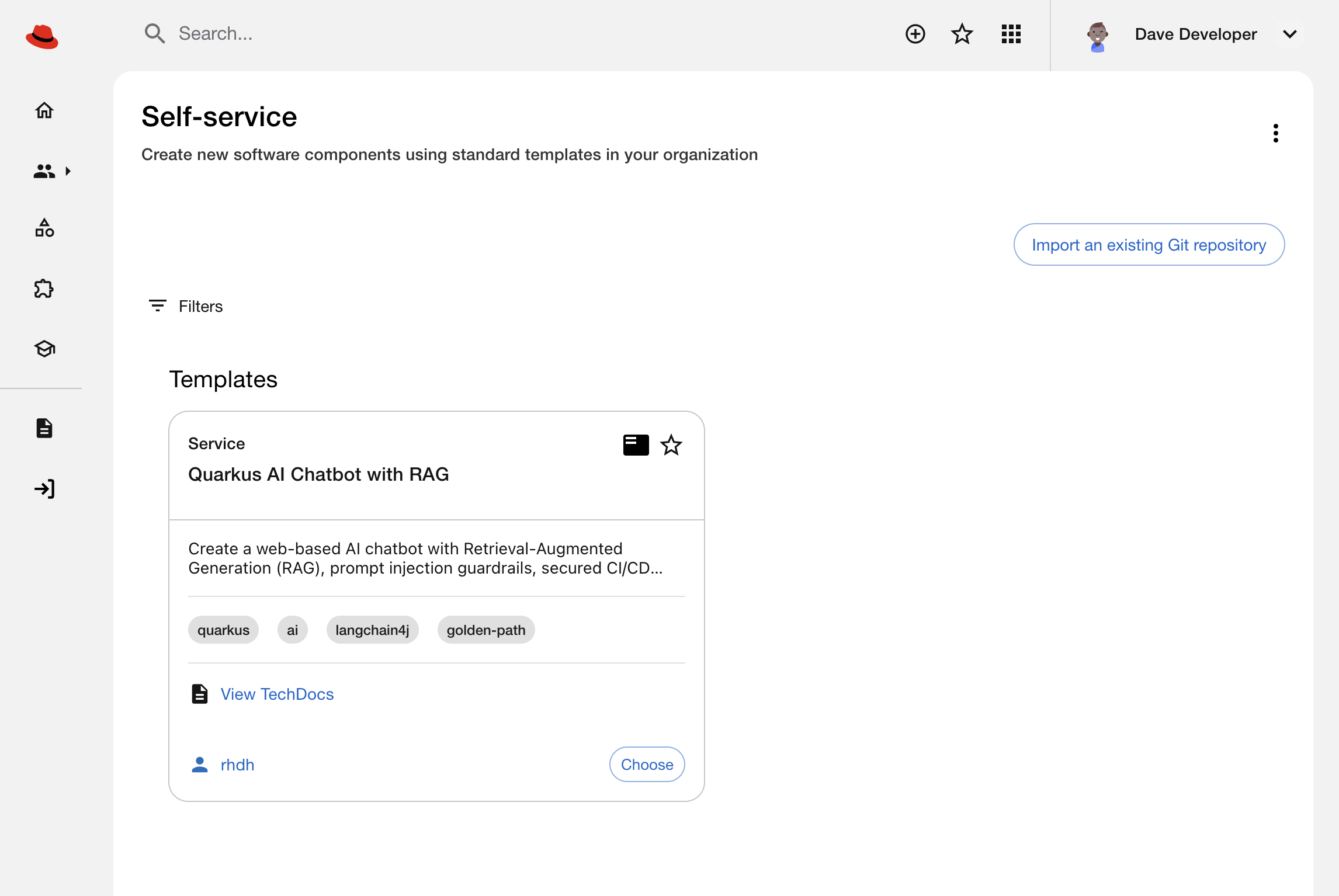 Figure 2. Self-service UI in Developer Hub showing a single Software Template
 -
Review the
template.yamlfile in the quarkus-chatbot-rag template repository in GitLab to understand the golden path it implements. The specific sections are in thetemplate.yamlfile:The template.yamlfile is a manifest that Developer Hub reads to implement the self-service software template. Specifically, it defines parameters, steps, and outputs that the Platform Team uses to craft the self-service flow. Learn more by reading the Backstage Software Templates documentation.-
Captures user supplied parameters — such as the application name, group ownership, and a short description (for the generated
catalog-info.yaml) -
Scaffolds application code — generates a Quarkus application with LLM client dependencies and External Secrets integration for API keys
-
Creates source and GitOps repositories — sets up two GitLab repos: one for Java source code, another for GitOps manifests (Helm chart references and values)
-
Registers the new application with the app-of-apps — pushes bootstrap configuration to the infra-app-of-apps repository (more on this in a moment), which triggers Argo CD to deploy the application infrastructure
-
Registers in catalog — adds the component to Developer Hub with ownership, dependencies, and CI/CD integration
-
The app-of-apps is a special Argo CD Application, owned by the Platform Team, that manages rollout of GitOps manifest repositories like the one you just created. Visit the rhdh/infra-app-of-apps repository in GitLab and read the README.md if you want to learn about the implementation specifics. Argo CD automatically deploys standardized infrastructure for the developers using the platform’s build-deployer and app-deployer Helm charts:
-
Build namespace with Tekton pipeline, SonarQube scanning, ACS image scanning, SBOM generation, and External Secrets for credentials
-
Dev and Prod namespaces with Deployments, Services, Routes, network policies, ServiceMonitors, and resource limits
The following is a visual depiction of the output of the software template - this illustrates the value of codifying your processes; developers complete a form and the platform handles the rest!
Exercise 2: Run the template
Enough exposition, let’s experience the software template as a developer would.
-
Click Choose on the template to start the wizard
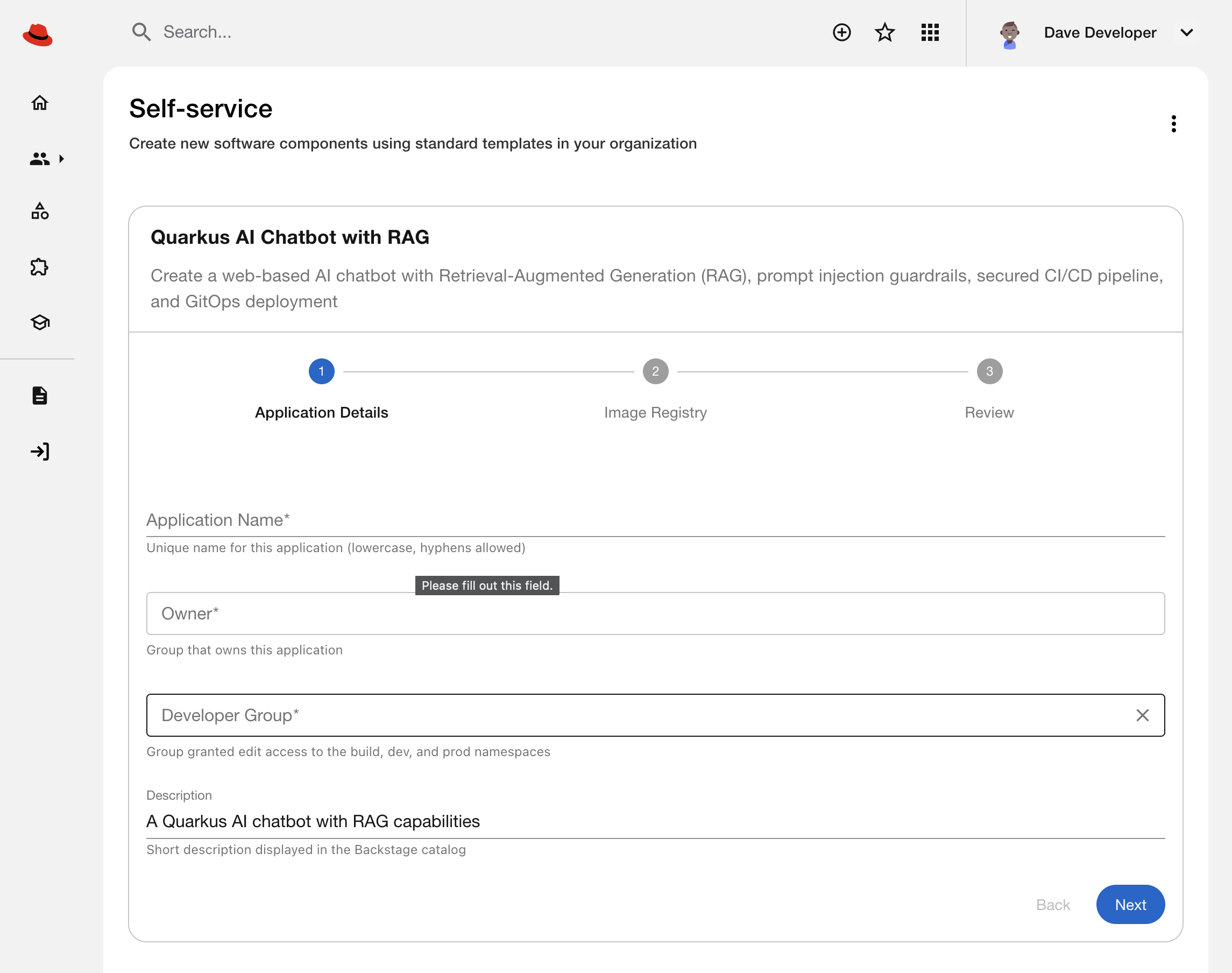 Figure 3. Template input parameters being captured in Developer Hub
 -
Fill in the parameters:
-
Application name: Choose a name (e.g.,
parasol-chatbot) -
Owner: Select
group:default/developersin the dropdown -
Developer Group: Select
group:default/developersin the dropdown -
Description: The default is fine
-
Accept the defaults for other fields
-
-
Click Next. Leave the image registry settings unchanged, then proceed to the Review screen.
-
Click Create to execute the template. Watch the progress as the template:
-
Scaffolds the application code
-
Creates the GitLab repository
-
Configures the CI/CD pipeline
-
Registers the new component in the catalog
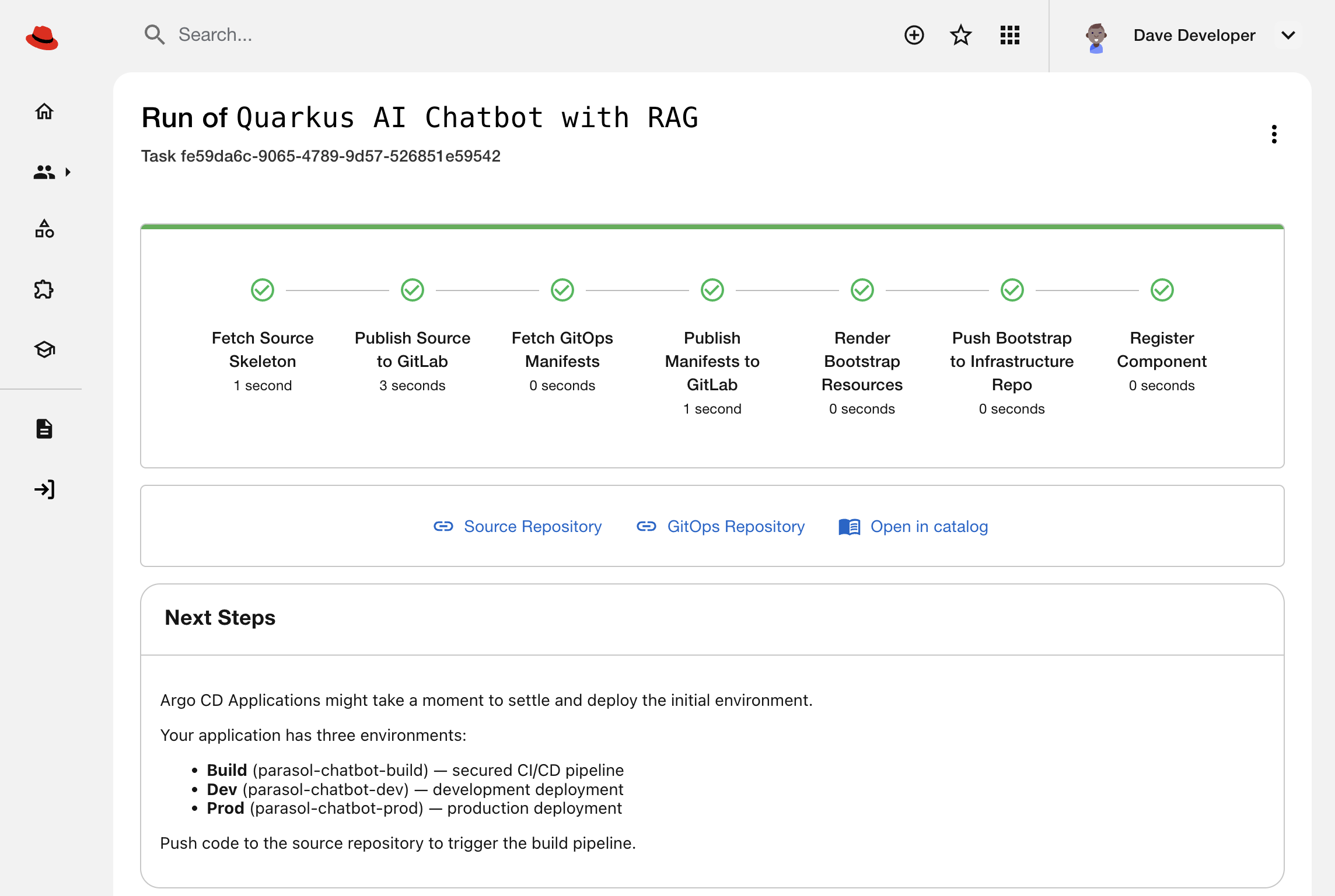 Figure 4. Developer Hub showing a finished run of the Template
-
-
Once complete, three links are printed. Explore the generated repositories:
-
Click the Source Repository link — notice there’s no Kubernetes YAML, just Java application code that uses the Quarkus framework
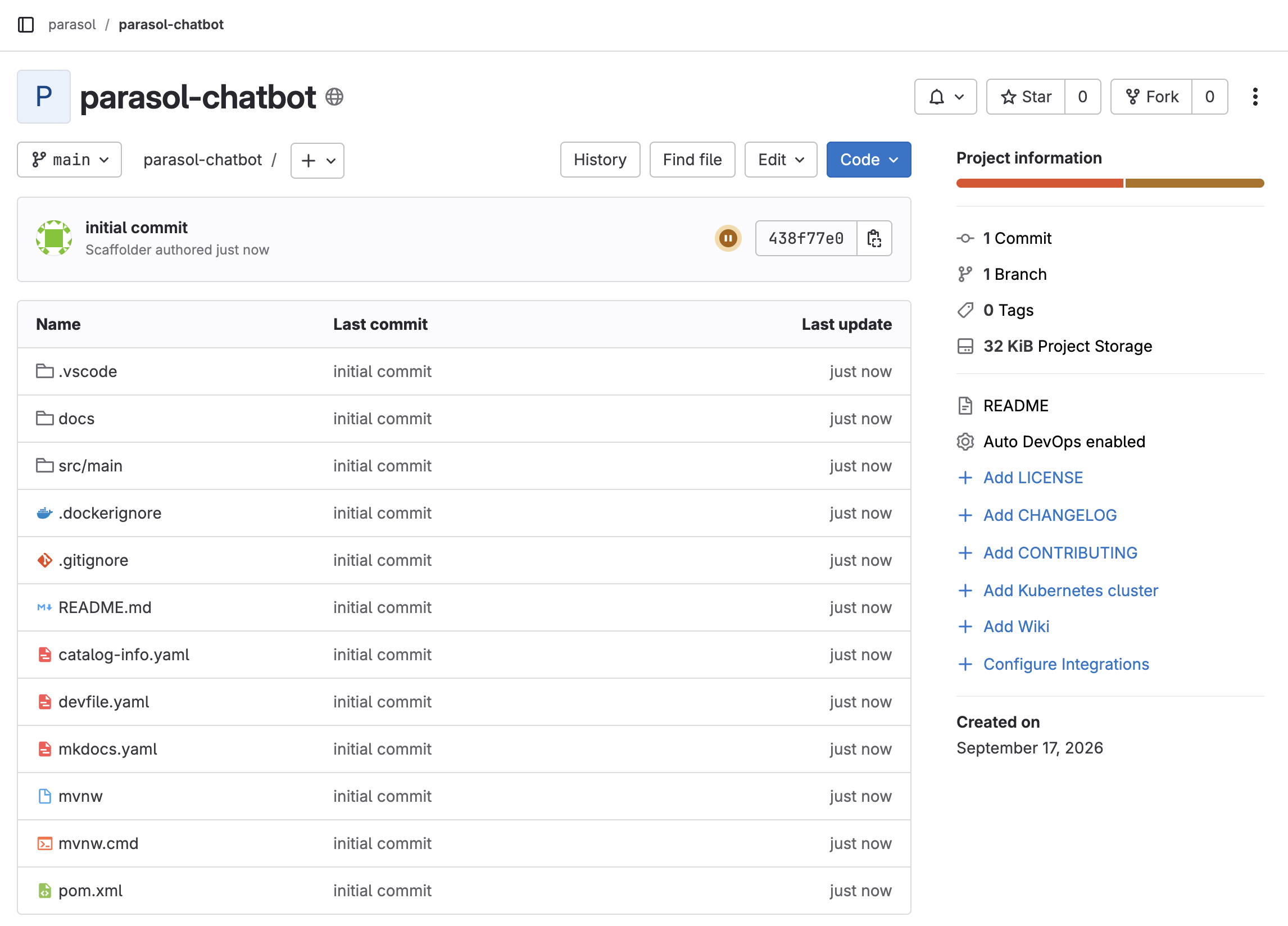 Figure 5. New GitLab repository containing Quarkus code and a catalog-info.yaml
 -
Click the GitOps Repository link — the
app/andbuild/folders contain minimal Helm chart references andvalues.yamloverrides. TheChart.yamlfiles reference the platform team’sbuild-deployerandapp-deployercharts that do the heavy lifting to setup your environments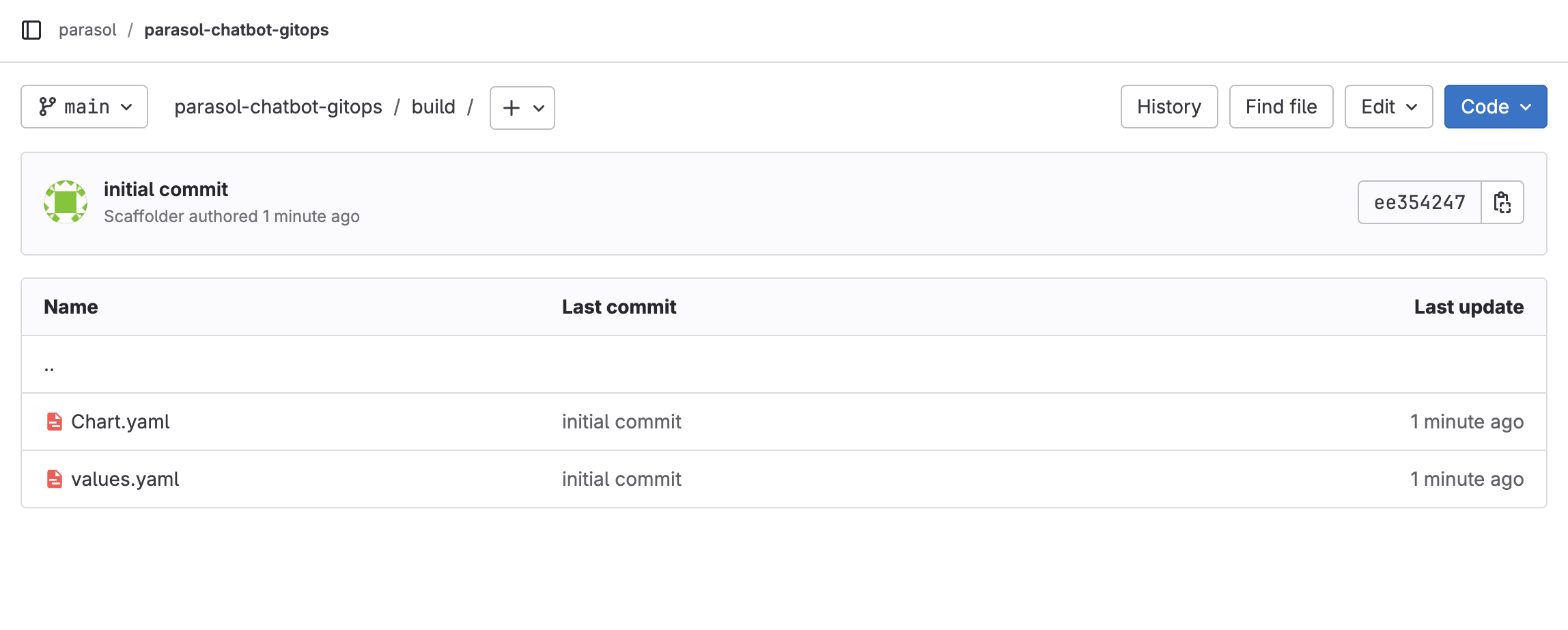 Figure 6. GitLab GitOps repository with minimal build YAML
-
Continue to the next section, where we’ll use the Open in catalog link to see what else was created by the software template.
Exercise 3: Inspect what the platform built
The template created infrastructure that would take hours to configure manually. Let’s explore it through Developer Hub and the terminal.
-
Click the Open in catalog link from the template output to view your new component in Developer Hub. Note that it has links to the source code and component’s documentation, as well as additional tabs with more information
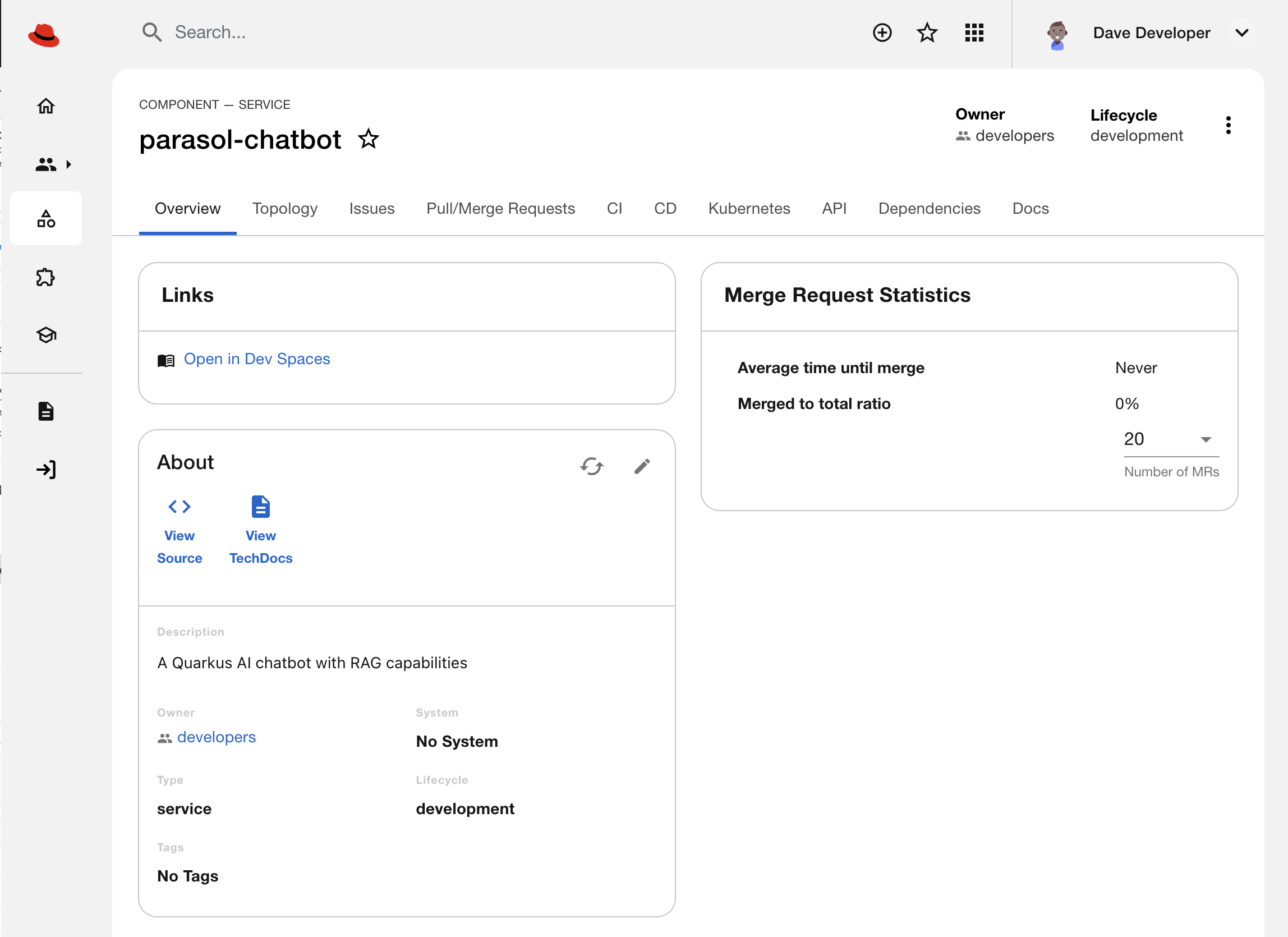 Figure 7. Parasol Chatbot entity in the Developer Hub catalog
 -
Verify the three namespaces created for your application using the terminal:
oc get projects | grep parasol-chatbotYou should see:
-
parasol-chatbot-build— CI/CD infrastructure (Tekton pipelines, External Secrets, build cache) -
parasol-chatbot-dev— development deployment managed by Argo CD -
parasol-chatbot-prod— production deployment (promoted via GitOps)If the namespaces are not listed, wait a minute and retry the command. There’s a short delay between running the template and Argo CD rolling out the infrastructure. You can speed it up by finding the infra-app-bootstraps* Application in Argo CD and clicking Refresh.
-
-
In Developer Hub, click the CI tab to watch the pipeline execution:
-
The Tekton pipeline runs SonarQube analysis, builds the image, scans it with ACS, generates an SBOM, and uploads to TPA
-
Developers get visibility into build status without leaving Developer Hub
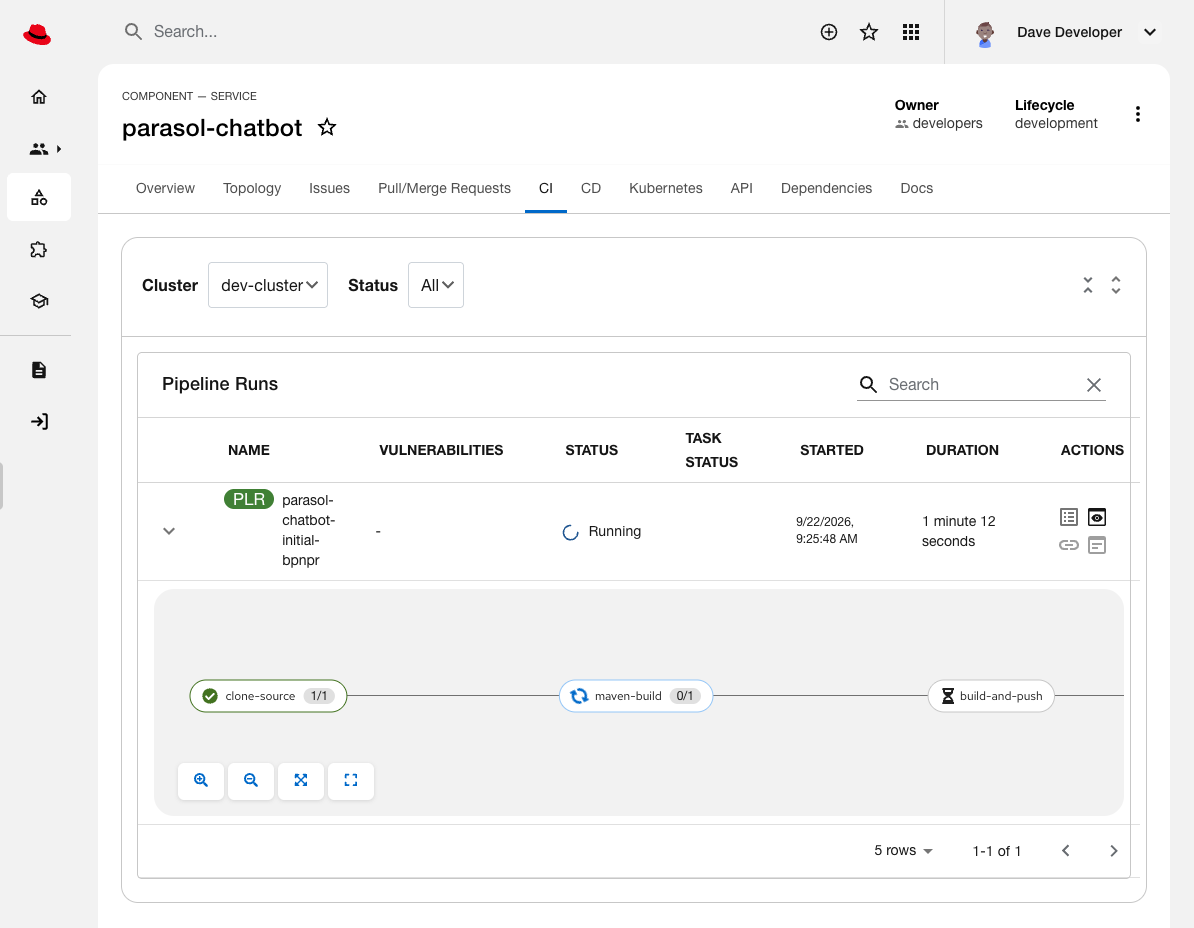 Figure 8. Tekton PipelineRun as seen in Developer Hub
Click on the running PipelineRun to view the detailed task execution:
-
maven-build— compiles the application -
sonar-scan— static code analysis for vulnerabilities -
generate-sbom— creates a Software Bill of Materials -
acs-image-scan— scans the container image for CVEs -
acs-image-check— enforces security policy gates -
upload-sbom-to-tpa— registers the SBOM with Trusted Profile Analyzer for continuous monitoring -
rollout-restart— updates thedevenvironment to use the newly built image
-
-
-
Click the CD tab to verify that build, dev, and prod Applications were registered in Argo CD:
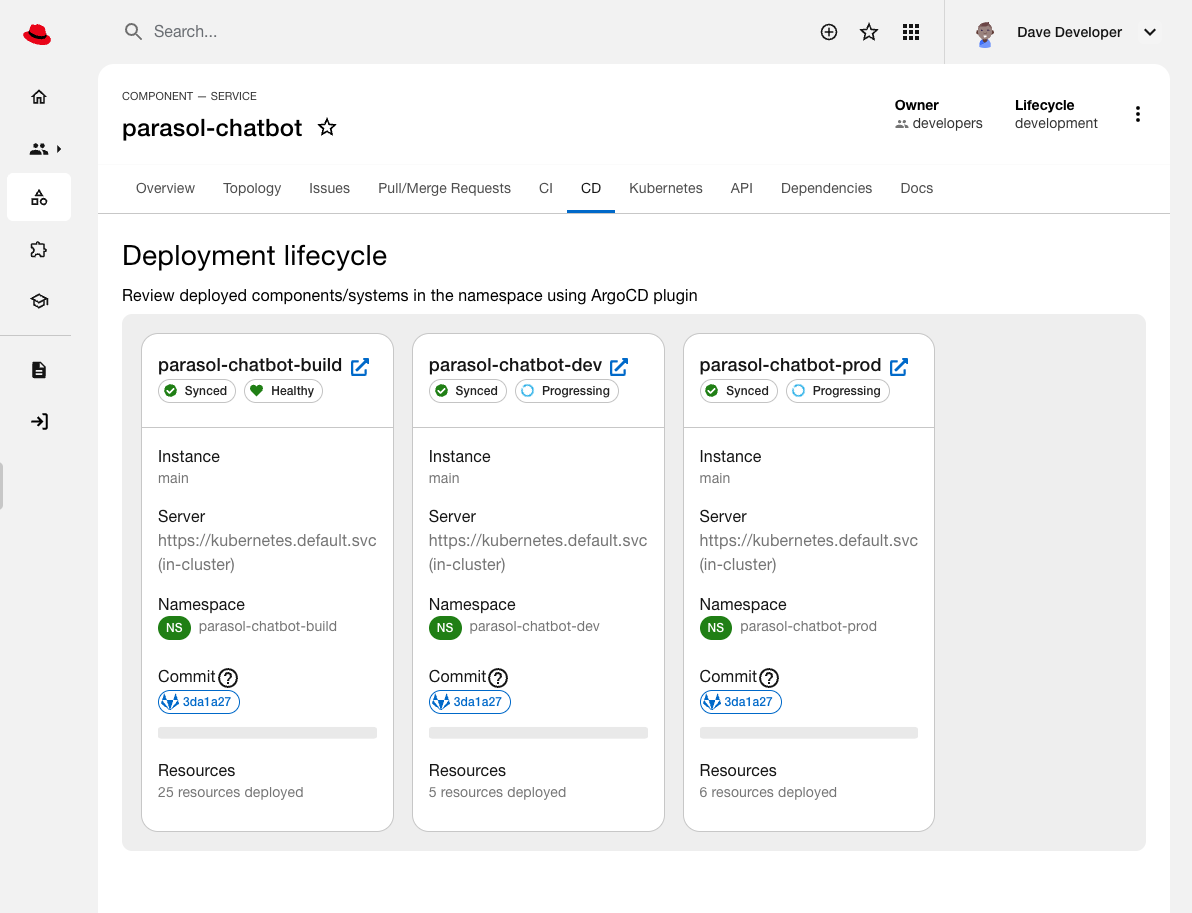 Figure 9. Argo CD Applications that manage environments as seen in Developer Hub
 -
Click the Topology tab to explore the dev environment’s deployment:
Both dev and prod environments will show error states until the first build is complete. 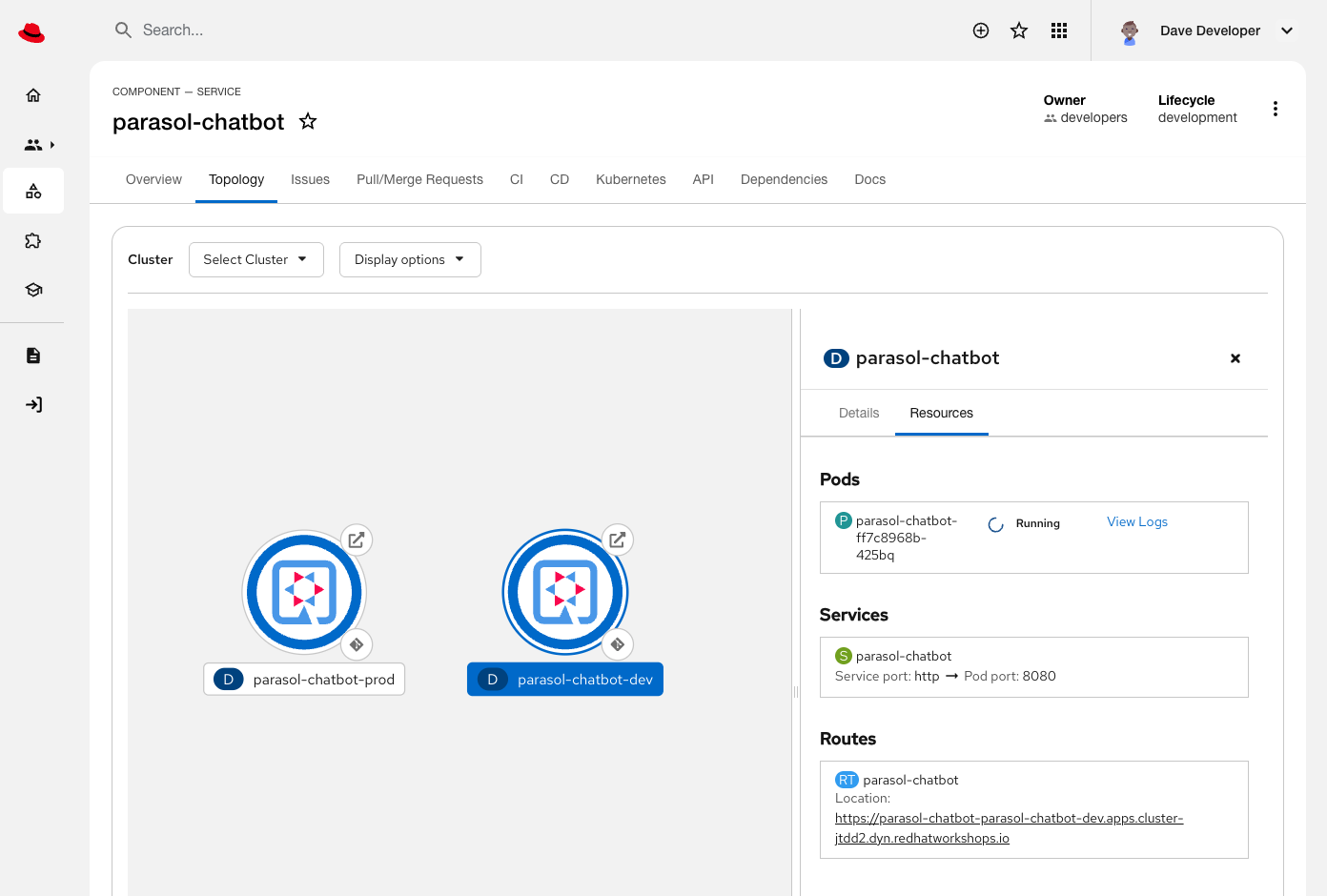 Figure 10. Production and Development applications in the Topology View, with Development environment Route, Service, and Pod details shown
Module summary
This is where platform engineering delivers transformational impact.
What the developer experienced:
-
Filled in a simple form (application name, description)
-
Clicked "Create"
-
Got a production-ready application in minutes
What the platform team delivered invisibly:
-
Zero infrastructure code for developers — no Dockerfiles, no Kubernetes YAML, no pipeline definitions. The
build-deployerandapp-deployerHelm charts encode the platform team’s standards. -
Security by default, not by request — every application gets SonarQube analysis, ACS vulnerability scanning, SBOM generation, and continuous monitoring via TPA. Developers can’t skip the security gates.
-
Standardized deployment patterns — network policies, resource limits, health checks, observability (ServiceMonitors), and autoscaling configured consistently across all applications.
-
GitOps-driven promotion — changes flow through build → dev → prod namespaces following the platform team’s workflow. Developers push code; Argo CD handles deployment.
-
Integrated toolchain — External Secrets Operator injects credentials from Vault, Tekton triggers builds from GitLab webhooks, Argo CD syncs from GitOps repos, and Developer Hub provides unified visibility.
What this means for Parasol:
-
Consistent compliance — security and quality gates applied uniformly; no "forgot to add the SBOM step" incidents
-
Reduced cognitive load — developers focus on business logic in their language of choice; infrastructure is handled
-
Easier maintenance — platform team updates the Helm charts once; all applications benefit from improvements
-
Faster time to market — new applications in minutes instead of weeks spent writing YAML and configuring pipelines
This is the multiplier effect of platform engineering: build the golden path once, enable hundreds of teams to run it reliably.
In the next module, you will experience how developers can use a standardized Cloud Development Environment (CDE) provided by OpenShift Dev Spaces to develop applications with AI assitance in a hosted VS Code environment hosted on OpenShift.